


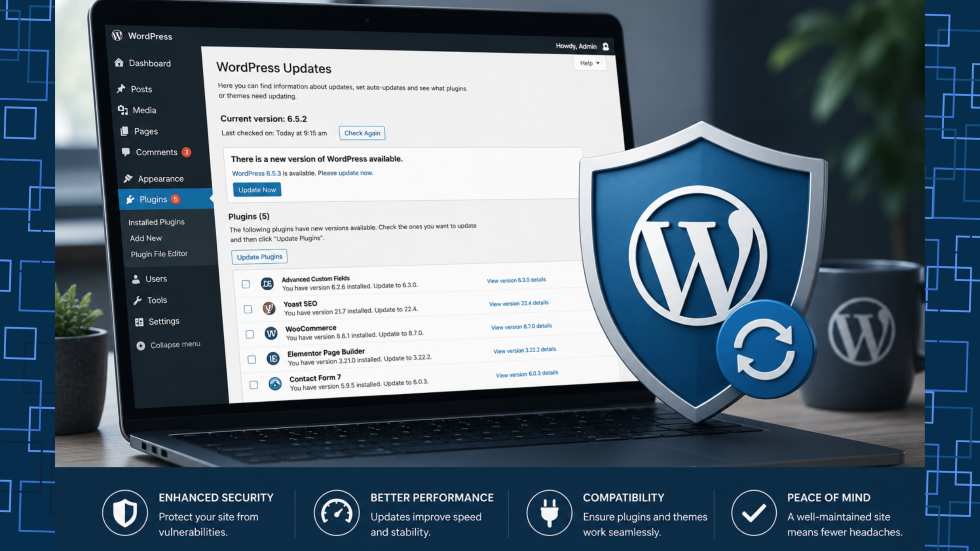

If your website appears to be working perfectly, it can be tempting to ignore those WordPress update notifications.
After all, why fix something that isn’t broken?
It’s one of the most common mindsets among website owners—and one of the riskiest.
WordPress updates are often seen as minor housekeeping tasks. They’re one of the most important parts of maintaining a secure, reliable, and high-performing website. Delaying updates might feel safer in the short term, especially if you’re worried about something that could break. But over time, that delay creates a growing technical and security risk.
For many businesses, the biggest website problems don’t come from dramatic failures. They come from small maintenance tasks that were ignored for too long.
The hidden risk of “it still works”
A website can appear healthy on the surface while serious issues develop underneath.
Outdated plugins, themes, and WordPress core files often continue functioning—until they suddenly don’t.
That failure usually shows up as:
- broken forms
- layout issues after a browser update
- slower page speed
- payment or integration failures
- unexpected plugin conflicts
- or, worst of all, a compromised website
In many cases, warning signs only appear after the damage is done.
Security is the biggest reason to update
Most WordPress security vulnerabilities don’t come from WordPress itself.
They come from plugins and themes.
That’s important because WordPress powers around 42–43% of all websites globally, making it a major target for automated attacks.
Attackers don’t usually “hack websites” manually. They run automated scans looking for known vulnerabilities in outdated software.
And there are plenty to find.
In one recent weekly report, Wordfence disclosed 279 vulnerabilities across WordPress plugins and themes in just seven days.
That’s why plugin developers release updates so frequently:
- to patch newly discovered security flaws
- to close known vulnerabilities
- to reduce exposure before attackers exploit them
If you delay those updates, you will effectively leave the door unlocked.
Regular website maintenance and performance optimisation can significantly reduce the chances of these vulnerabilities affecting your business website.
“But what if an update breaks my site?”
This is the most common reason website owners postpone updates.
And it’s understandable.
No one wants to click “Update” and watch their homepage disappear.
But this concern often creates the opposite problem.
Avoiding updates for months—or years—means you eventually face a much larger, riskier jump between versions. That increases the chance of:
- compatibility failures
- deprecated functions
- theme conflicts
- database issues
- and full-site crashes
In other words: delaying updates doesn’t reduce risk—it compounds it.
The safer approach is small, regular updates with proper testing and backups.
Businesses that invest in WordPress website maintenance services often avoid these larger technical failures altogether.
Compatibility matters more than most people realise
WordPress websites are ecosystems.
Your site likely depends on:
- WordPress core
- multiple plugins
- a theme
- your hosting environment
- PHP
- browsers
- third-party tools like CRMs, payment gateways, or booking systems
When one-part changes, everything else needs to be kept up.
Older plugins may stop working properly with:
- newer WordPress releases
- updated PHP versions
- browser changes
- modern security requirements
- external API changes
This often causes “mystery issues” such as:
- forms not submitting
- images loading incorrectly
- slow admin dashboards
- login issues
- checkout failures
These problems are often blamed on hosting or “WordPress being buggy” when the real issue is simply outdated software.
A proactive website support and maintenance strategy helps ensure all parts of your website continue working together smoothly.
Updates also improve performance
Security gets most of the attention, but performance matters too.
Developers don’t only release updates to fix vulnerabilities.
They also improve:
- code efficiency
- database queries
- caching compatibility
- plugin speed
- mobile responsiveness
- browser support
That means updates can directly improve:
- page load speed
- Core Web Vitals
- SEO performance
- user experience
A faster, more stable website with better SEO performance usually starts with cleaner, better-maintained code.
Regular updates combined with technical SEO optimisation can also help improve visibility in search engines and overall website performance.
WordPress website maintenance is not a one-time task
A common misconception is that once a website is launched, hard work is done.
It isn’t.
A website is more like a vehicle than a brochure.
You wouldn’t buy a car and never service it.
Websites need ongoing maintenance too.
That includes:
- WordPress core updates
- plugin updates
- theme updates
- backups
- security monitoring
- uptime monitoring
- plugin audits
- performance checks
Without that routine care, technical debt builds quietly.
Eventually, it becomes expensive.
A practical WordPress update routine
Good maintenance doesn’t need to be complicated.
A simple monthly process can dramatically reduce risk.
- Back up before every update
Always create a full backup of:
- website files
- database
- media
That gives you a rollback option if something goes wrong.
- Update regularly
Don’t let updates pile up.
Smaller, more frequent updates are easier to manage and less risky.
Weekly or fortnightly is ideal for active websites.
- Test major changes in staging
Before updating:
- major plugins
- custom themes
- WordPress major releases
Test them in a staging environment first.
This helps identify issues before they affect customers.
- Remove unused plugins and themes
Inactive plugins still create risks.
Delete anything you don’t need.
Less software means:
- fewer vulnerabilities
- fewer conflicts
- easier maintenance
- Watch plugin quality
Not all plugins are equal.
Avoid plugins that:
- haven’t been updated recently
- have poor reviews
- appear abandoned
- have weak support histories
A cheap plugin can become an expensive problem.
The real cost of ignoring updates
When businesses postpone maintenance, they often save a few minutes now—and lose days later.
That cost can include:
- emergency developer fees
- lost leads
- broken sales funnels
- SEO damage
- reputational harm
- recovery from malware
- customer trust issues
Compared to that, regular updates are inexpensive insurance.
Businesses that prioritise search engine optimisation and website performance maintenance are usually better positioned to avoid these costly disruptions.
Final takeaway
WordPress updates are not optional for maintenance.
They are risk management.
They protect your website from security threats, improve compatibility, reduce downtime, and help your business avoid preventable technical issues.
The best time to update your website is before something goes wrong.
Because once something breaks, it’s already too late.
Related Articles

Why Choose Us?
With decades of experience and a dedicated team, we are committed to delivering high-quality web development services. Our client-centric approach ensures that we understand your needs and provide solutions that exceed your expectations.