


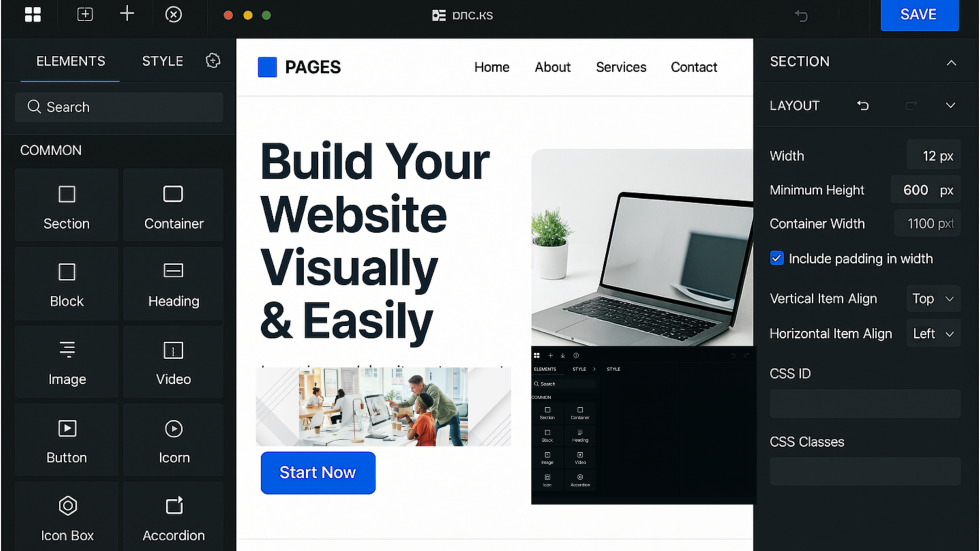

If you’ve worked on WordPress projects for a while, chances are you’ve used Elementor.
It’s popular for a reason—easy to use, flexible, and widely supported. Once you’re comfortable with it, it’s tempting to stick with what you know.
But every now and then, a tool comes along that’s worth exploring—not because it replaces what you use, but because it offers a different way of thinking about the same problem.
For many developers, Bricks Builder is starting to feel like that option.
Familiar, But Not the Same
One of the first things you’ll notice when trying Bricks Builder is how familiar it feels.
If you’re coming from Elementor:
- The drag-and-drop interface makes sense
- The layout structure is easy to follow
- You can start building without a steep learning curve
That familiarity lowers the barrier to entry.
But once you go beyond the basics, the differences start to show.
Bricks isn’t just a page builder—it’s a theme and builder combined.
This changes how you approach building sites, especially when it comes to structure and performance.
Cleaner Output, Less Guesswork
A common frustration with visual builders is the HTML they generate.
Extra wrappers, deeply nested elements, and unclear class naming can make debugging or extending a site more difficult.
During testing, one of the standout differences with Bricks was the output:
- Cleaner HTML structure
- Easier to read and follow
- More predictable behaviour
For developers, this matters.
It means:
- Less time inspecting elements
- Fewer surprises when styling
- A smoother handoff if custom code is needed
A More Structured Approach to Styling
Another area where Bricks stands out is how it handles styling.
Instead of relying heavily on inline styles or one-off adjustments, it encourages the use of global CSS classes.
Why This Matters
- Styles become reusable across components
- Changes can be made in one place
- Design systems are easier to maintain
This approach feels closer to how developers naturally work—more structured, more scalable, and less repetitive.
Built for Dynamic Content
Modern WordPress builds often rely on dynamic data—custom fields, templates, and repeatable content.
Bricks leans into this.
Based on its documentation and testing, it supports:
- Dynamic data integration for custom fields
- Template-based content structures
- Flexible content rendering across pages
This makes it easier to build:
- Listing pages
- Custom post layouts
- Data-driven sections
Without needing to rely heavily on additional plugins or complex workarounds.
Query Loop and Advanced Filtering
One feature that stands out is the Query Loop.
It allows you to:
- Display dynamic content (like posts or products)
- Apply custom queries
- Control how content is rendered
More importantly, Bricks includes support for:
- AJAX-powered filtering
- Sorting
- Live search
This opens up more advanced use cases without requiring custom development from scratch.
For example:
- Filterable blog listings
- Dynamic product grids
- Search-driven content sections
Developer-Friendly Features (Without Losing Visual Control)
Bricks sits in an interesting position.
It keeps the convenience of a visual builder but adds features developers typically look for:
- Semantic HTML output
- Reusable CSS classes
- Server-side element conditions
- Built-in custom code support
This combination gives you more control without forcing you to abandon the visual workflow.
It feels less like working around a builder—and more like working with one.
There Is Still a Learning Curve
It’s worth noting that Bricks isn’t a drop-in replacement for Elementor.
Even though the interface feels familiar, there are differences:
- How layouts are structured
- How styling is applied
- How components are reused
This means there’s still a learning curve.
But it’s not overwhelming—especially if you already understand how page builders work.
When Bricks Makes Sense
Bricks may be worth trying if you:
- Want cleaner, more predictable HTML output
- Prefer a structured approach to styling
- Work with dynamic content regularly
- Need more flexibility without going fully custom
It’s particularly appealing for developers who feel limited by traditional page builders but don’t want to give up speed and efficiency.
A Practical Perspective
After testing Bricks Builder, the biggest takeaway isn’t that it’s “better” than Elementor.
It’s that it offers a different balance.
- Familiar enough to pick up quickly
- Structured enough to scale more cleanly
- Flexible enough for more advanced builds
For developers, that combination is worth exploring.
Final Takeaway
It’s easy to stick with tools you already know—especially when they work.
But trying alternatives like Bricks Builder can open up new ways of working.
Not every project needs a change.
But for those where:
- Structure matters
- Flexibility is important
- And long-term maintainability is a priority
Bricks is worth a closer look.
Because sometimes, the best improvements don’t come from working harder—they come from using tools that make the work clearer and more manageable.
Related Articles




Why Choose Us?
With decades of experience and a dedicated team, we are committed to delivering high-quality web development services. Our client-centric approach ensures that we understand your needs and provide solutions that exceed your expectations.