


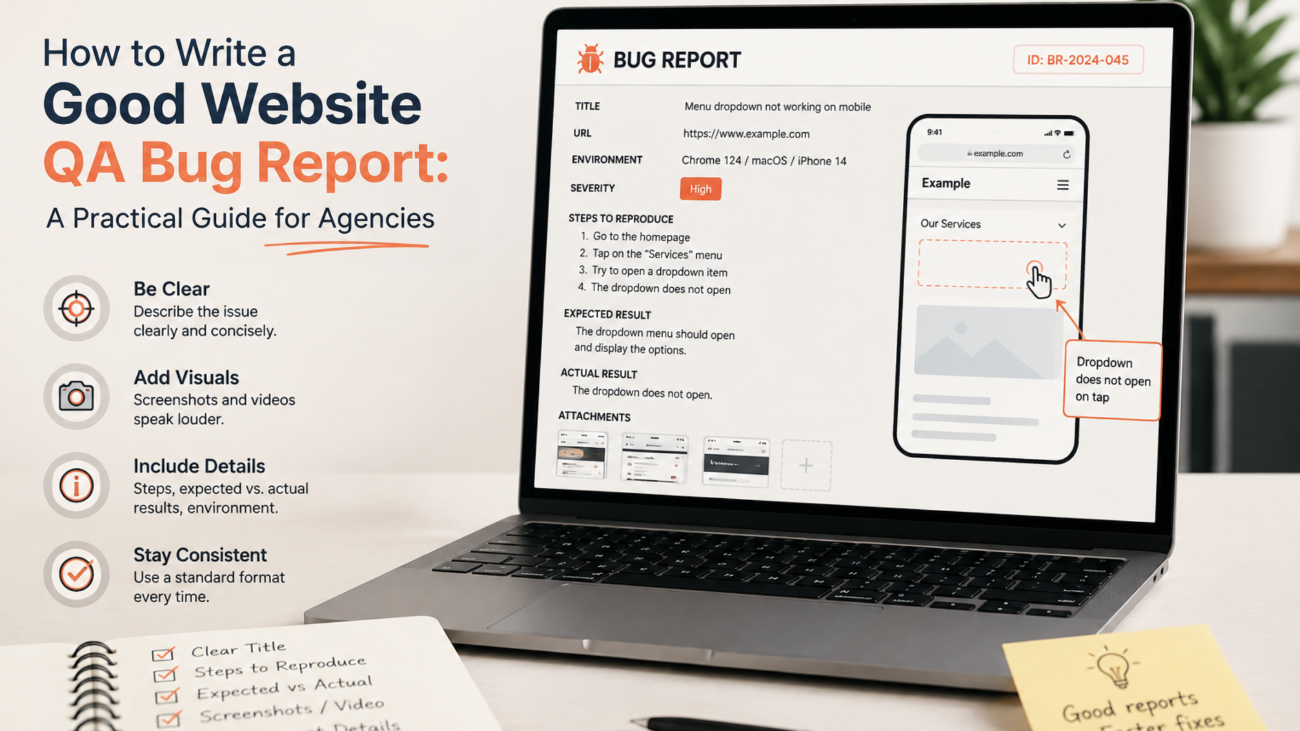

Website QA is about more than finding problems. It is about communicating those problems clearly enough that someone else can investigate and fix them without having to guess what happened.
When learning how to write a good bug report, it helps to think of every report as a clear handoff between the person testing the website and the person responsible for fixing the issue.
This becomes particularly important when QA and development are handled by different people, teams or agencies. A vague report can lead to questions, repeated testing and unnecessary back-and-forth. A well-written report, on the other hand, gives a developer a clear path from identifying the issue to reproducing and resolving it.
A useful bug report should answer a few simple questions:
- What is wrong?
- Where does it happen?
- How can someone reproduce it?
- What should happen instead?
- What actually happens?
- How serious is the issue?
Getting these details right can make the entire QA workflow more efficient.
- Start with a clear issue description
The first part of a bug report should make the problem immediately understandable.
Avoid descriptions such as:
“The website is broken.”
Or:
“Something wrong with the menu.”
These descriptions give the development team very little to work with.
Instead, describe the specific behaviour you observed.
For example:
Mobile navigation menu does not open when the hamburger icon is tapped on iPhone 15 using Safari.
For a website bug report to be useful, the issue description should identify the affected feature, the action that triggers the problem and the environment where it occurs.
This tells the reader what is affected, what action causes the problem and where it occurs.
A good title should be concise but specific. Someone scanning a list of QA tickets should be able to understand the issue without opening every ticket.
Atlassian and BrowserStack both recommend structured bug reports with clear summaries, reproduction steps, expected and actual results, environment information and supporting evidence.
- Give developers clear steps to reproduce the issue
The most useful bug report allows someone who did not discover the issue to reproduce it themselves.
Write the steps in the order they need to be performed. Keep them specific and avoid assuming that the developer already knows what you did.
For example:
- Open the website on an iPhone 15 using Safari.
- Navigate to the homepage.
- Tap the hamburger menu in the top-right corner.
- Observe the navigation menu.
Compare this with:
“Go to the website and check the menu on mobile.”
The second version leaves too much open to interpretation.
Where possible, use the minimum number of steps required to reproduce the problem. This keeps the report easy to follow while still providing enough context.
If the issue is intermittent, also mention that. For example:
“The issue occurs approximately three out of five times when the menu icon is tapped.”
During website testing, noting how consistently an issue can be reproduced can give developers an important clue about the conditions under which the bug occurs.
Reproducibility is particularly useful because it helps developers determine whether the problem is consistent or dependent on specific conditions.
- Separate expected and actual results
One of the simplest ways to make a bug report clearer is to separate what should happen from what does happen.
Expected result
The navigation menu should open and display the available menu items.
Actual result
Nothing happens when the hamburger icon is tapped. The navigation menu remains closed.
This distinction removes ambiguity.
It also helps developers understand the intended behaviour without having to refer back to a separate conversation, design file or previous meeting.
For website QA, this is especially useful for functionality and user journeys. Whether you are testing a contact form, checkout process, navigation, search function or responsive layout, the difference between expected and actual behaviour should be explicit.
- Always include the browser and device
A website may work correctly in one environment and fail in another.
That means saying simply “the website doesn’t work” is rarely enough.
Include relevant environment information such as:
- Device and model
- Operating system and version
- Browser and version
- Website environment, such as staging or production
- Website or build version where relevant
- Connection type if it could affect the issue
For example:
Device: iPhone 15
OS: iOS 18
Browser: Safari
Environment: Staging
This information gives developers a much better chance of recreating the same conditions.
It is particularly important for responsive websites, where layout, interactions and browser behaviour can vary across devices and browsers. Atlassian specifically recommends recording environment details because some bugs can only be reproduced under particular conditions.
Regular QA can also support website performance optimisation by helping teams identify issues that affect page behaviour, usability and the overall experience across different devices.
- Use screenshots and recordings as evidence
Some website issues are difficult to explain with words alone.
A screenshot can quickly demonstrate:
- A layout problem
- Incorrect spacing
- Missing content
- Broken imagery
- A visual alignment issue
- An error message
- A responsive design problem
For issues involving movement or a sequence of actions, a short screen recording can be even more useful.
For example, a recording can show exactly what happens when a user:
- Adds an item to a cart.
- Opens the checkout.
- Enters their details.
- Clicks the payment button.
- Encounters an error.
The written report should still contain the important information, but the recording provides additional context.
Atlassian notes that recordings can be particularly useful when a bug is difficult to explain in text, involves multiple steps or only occurs under specific conditions.
The goal isn’t to create a lengthy video for every issue. A short, focused recording is often enough.
- Understand severity versus priority
Severity and priority are related, but they are not the same thing.
Severity describes the impact of the bug.
Priority describes how urgently it should be addressed.
For example, a typo on an important campaign landing page may have low technical severity but high business priority because the page is about to go live.
Likewise, a significant technical issue in an internal admin feature might have high severity but a lower immediate priority if it does not affect customers and there is a practical workaround.
A simple approach is to consider:
Severity
- Critical: Blocks an important user journey or causes major system failure.
- High: Significantly affects an important feature.
- Medium: Causes noticeable problems but a workaround may exist.
- Low: Minor functional or visual issue.
Priority
- High: Needs attention immediately or before release.
- Medium: Should be addressed during the normal development cycle.
- Low: Can be scheduled after more important work.
The exact labels can differ between teams. What matters most is that everyone agrees on what those labels mean and applies them consistently.
- Keep the report factual
A good bug report describes what was observed without trying to diagnose the cause.
For example:
“The checkout button remains disabled after all required fields have been completed.”
is more useful than:
“The JavaScript validation is probably broken.”
The first statement reports an observable fact. The second makes an assumption about the underlying cause.
QA’s role is to provide enough information for the development team to investigate. It is not necessary to guess why the issue occurred unless the cause has already been confirmed.
This also makes reports easier for different teams to understand, particularly when QA, project management and development are working across different organisations.
For websites where search visibility is important, QA can also complement SEO services by helping identify technical issues that may affect how users and search engines access and experience the site.
- A simple QA bug report structure
For agency teams, a consistent template can make reporting much easier.
A practical structure is:
Title:
Short, specific description of the issue.
Description:
Brief explanation of what is wrong and where it occurs.
Steps to reproduce:
Numbered actions required to see the issue.
Expected result:
What should happen.
Actual result:
What happens instead.
Environment:
Browser, browser version, device, OS and relevant website/build information.
Evidence:
Screenshots, screen recordings, console errors or other useful supporting information.
Severity:
How significantly the issue affects functionality or users.
Priority:
How urgently the issue should be addressed.
This structure is consistent with established bug-reporting guidance from tools such as Jira and BrowserStack.
Better bug reports create better workflows
The real value of a good bug report isn’t just the individual ticket.
When QA reports are consistently clear, development teams spend less time asking for missing information. QA testers spend less time repeating tests or explaining the same issue. Project managers have better visibility of outstanding problems, and agencies can collaborate more effectively with their delivery partners.
For agencies managing business website development, consistent QA documentation can also make handoffs between designers, developers and clients more efficient.
In other words, good QA reporting turns a bug from a vague complaint into an actionable piece of work.
That is particularly important when teams are distributed or working across agency and delivery environments. Clear documentation creates a shared understanding of the problem, even when the people involved are not in the same meeting or time zone.
The practical takeaway
A good bug report doesn’t need to be long. It needs to be clear, specific and actionable.
Before submitting a QA issue, ask:
- Have I clearly explained what is wrong?
- Could another person reproduce it from my steps?
- Have I stated the expected and actual results?
- Have I included the browser and device?
- Have I attached useful visual evidence?
- Have I correctly assessed severity and priority?
If the answer is yes, the development team has what it needs to start investigating rather than coming back with questions.
Good QA isn’t simply about finding bugs. It’s about communicating them well enough to get them fixed.
Related Articles





Why Choose Us?
With decades of experience and a dedicated team, we are committed to delivering high-quality web development services. Our client-centric approach ensures that we understand your needs and provide solutions that exceed your expectations.