


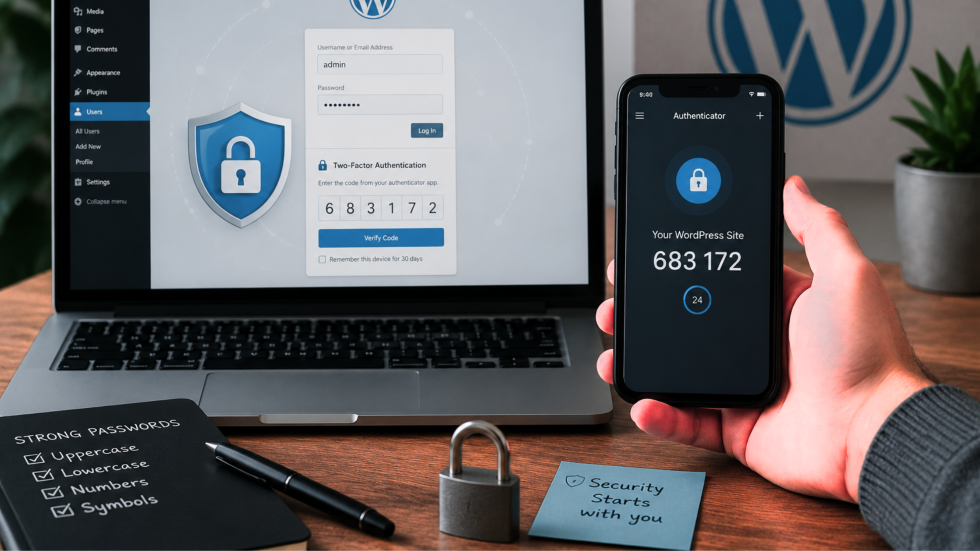

For many businesses, a WordPress website is more than an online brochure. Whether used for lead generation, customer communication or daily operations, effective corporate website development helps create secure and reliable digital platforms.
Despite common misconceptions, WordPress itself is a highly secure platform when it’s properly maintained. The majority of successful attacks don’t happen because someone found a flaw in WordPress—they happen because attackers gain access using legitimate login credentials.
Many business owners often ask, “is WordPress secure?” The answer is yes—when proper security practices, including regular updates and strong authentication methods, are in place.
That’s where Two-Factor Authentication (2FA) makes a significant difference. It’s one of the simplest security improvements you can make, yet it dramatically reduces the likelihood of unauthorised access.
Implementing WordPress two-factor authentication adds an important extra layer of protection by ensuring that compromised passwords alone are not enough for attackers to access your website.
Why passwords are no longer enough
Strong passwords remain important, but they’re no longer sufficient on their own.
Today, cybercriminals have multiple ways of obtaining login credentials, including:
- Phishing emails designed to trick users into revealing passwords.
- Data breaches from unrelated websites where passwords have been leaked.
- Password reuse across multiple online accounts.
- Automated brute-force attacks that test thousands of password combinations every minute.
According to Verizon’s 2025 Data Breach Investigations Report, stolen credentials continue to play a major role in security breaches, highlighting just how common compromised logins have become.
Even users with seemingly strong passwords can be at risk if those credentials have been exposed elsewhere.
This is why modern WordPress security strategies focus on protecting user accounts as much as protecting the website itself.
What is Two-Factor Authentication?
Two-Factor Authentication adds a second verification step after entering a username and password.
Instead of relying solely on something you know (your password), 2FA also requires something you have, such as:
- A temporary code generated by an authentication app
- A push notification on your mobile device
- A hardware security key
Even if an attacker discovers your password, they still can’t access your WordPress dashboard without the second authentication factor.
Think of it like your home’s front door. A strong lock is valuable, but adding a deadbolt makes forced entry considerably more difficult. Two-Factor Authentication provides that extra layer of protection for your website.
For website owners looking to strengthen WordPress security, enabling two-factor authentication is one of the most practical improvements available because it directly addresses one of the most common causes of account compromise.
Why it’s one of the first security measures to implement
In practice, enabling Two-Factor Authentication is one of the first security recommendations after launching a new WordPress website.
It delivers an excellent return for very little effort:
- It takes only a few minutes to configure.
- Most users quickly adapt to the additional login step.
- It significantly reduces the risk of compromised administrator accounts.
- It protects against both automated attacks and stolen credentials.
Unlike more complex security measures, 2FA doesn’t require ongoing maintenance once it’s configured. However, regular monitoring, updates and website maintenance services help ensure your website remains secure, stable and performing at its best.
It’s a simple improvement that continues protecting your website every time someone logs in.
2FA works best as part of a broader security strategy
Although Two-Factor Authentication is highly effective, it shouldn’t be viewed as the only security measure your website needs.
A layered approach provides much stronger protection.
While WordPress two-factor authentication is a powerful safeguard, effective WordPress security requires multiple layers of protection working together.
Key best practices include:
Use strong, unique passwords
Every administrator account should have a unique password that’s not reused across other websites or services. Password managers make this much easier by generating and securely storing complex passwords.
Keep WordPress updated
WordPress core, plugins and themes receive regular security updates. Delaying updates can leave known vulnerabilities exposed long after fixes have been released.
Limit administrator access
Not every user requires administrator privileges.
Grant users the minimum level of access necessary for their role, reducing the potential impact if an account is compromised.
Remove unused accounts
Old administrator accounts belonging to former staff, contractors or agencies are often forgotten. Regularly reviewing and removing unnecessary accounts reduces your attack surface.
Monitor login activity
Security plugins can alert you to repeated failed login attempts or suspicious activity, allowing you to respond before a small issue becomes a larger problem.
Combined with Two-Factor Authentication, these measures create multiple layers of defence rather than relying on a single safeguard.
Combined with Two-Factor Authentication, these measures create multiple layers of defence rather than relying on a single safeguard. Regular website optimisation services can also help improve reliability, speed and overall website performance.
When evaluating website protection options, understanding is WordPress secure depends largely on how well these security practices are implemented and maintained.
Choosing the right 2FA method
Not all Two-Factor Authentication methods offer the same level of security.
For most WordPress websites, authentication apps such as Google Authenticator, Microsoft Authenticator or Authy provide an excellent balance between security and convenience.
SMS-based authentication is generally considered less secure due to the risk of SIM-swapping attacks, although it’s still preferable to relying on passwords alone.
For organisations managing particularly sensitive systems, hardware security keys provide an even higher level of protection.
The right choice depends on your organisation’s needs, but any form of properly implemented 2FA is a substantial improvement over password-only logins.
Choosing the right WordPress two-factor authentication method helps businesses create a stronger security foundation without adding unnecessary complexity for users.
A small change with a big impact
Website security often feels overwhelming because there are so many potential risks to consider. Beyond security, businesses also need to maintain visibility online through effective SEO services that help customers discover their websites.
Fortunately, not every improvement needs to be complicated.
Enabling Two-Factor Authentication is one of the quickest, lowest-cost security upgrades available for WordPress websites. It protects against one of the most common causes of website compromise—stolen or guessed login credentials—without creating unnecessary friction for day-to-day users.
For businesses, agencies and website owners alike, it’s a practical investment that delivers immediate value, especially when combined with ongoing search engine optimisation and digital growth strategies.
Improving WordPress security does not always require complicated solutions, and adding 2FA is one example of a simple change that can deliver significant protection.
The takeaway
The vast majority of WordPress security issues don’t begin with flaws in the platform itself—they begin with compromised login credentials.
Adding Two-Factor Authentication significantly reduces that risk by ensuring a password alone isn’t enough to gain access.
When combined with strong passwords, regular updates and sensible user management, 2FA forms an essential part of a modern WordPress security strategy.
For anyone responsible for managing a WordPress website, it’s one of the simplest steps you can take to improve security—and one of the most effective.
For businesses wondering is WordPress secure enough for professional use, the answer comes down to implementing the right security measures, with two-factor authentication being one of the most effective first steps.
Related Articles




Why Choose Us?
With decades of experience and a dedicated team, we are committed to delivering high-quality web development services. Our client-centric approach ensures that we understand your needs and provide solutions that exceed your expectations.